FROM THE WORKBENCH · ARTICLE
Decoding Secret of Mana's Boot Logo in TypeScript
Learn LZ compression one small example at a time, then turn the game's compressed bytes into the Squaresoft boot logo.
On this page
All I wanted to do was change the Secret of Mana boot logo, little did I know the excellent adventure I was about to go on just to change a handful of pixels.
There is no image conveniently waiting in the cartridge, there isn't even a visible 4BPP graphic for the logo. There are compressed bytes, a small decoder, and the SNES graphics chip expecting a particular arrangement of pixels.
If you are comfortable with JavaScript, TypeScript or most C-like languages you already know most of the tools we will need: arrays, indexes, a loop, and a few bitwise operators. You do not need to know compression algorithms or SNES graphics to follow along.
We will build up the decoder one a piece at a time. All of the examples start paused. Press Step to advance one operation, or Run to jump to the result. Use the slider to revisit earlier steps. Reset restores the original input and returns to step zero. The editable boxes contain data the TypeScript around them explains the code that operates on it.
By the end, we'll decode the actual Squaresoft boot-logo layer.
Start With Some Bytes
Let's imagine you want to store this text:
const bytes: Uint8Array = new TextEncoder().encode("BANANA");
// Uint8Array [66, 65, 78, 65, 78, 65]
For these ASCII characters, each letter occupies one byte. Writing all six bytes works alright. But the last three letters repeat a pattern that has already started.
BUT what if our file could contain instructions for rebuilding the text?
type Command =
  | { kind: "literal"; bytes: Uint8Array }
  | { kind: "copy"; distance: number; length: number };
A literal means "write these bytes." A copy means "go backward in the output, and start a copy from there." We will only need these two operations for the compression format in this post.
The family of compression techniques that reuses earlier data this way is usually called LZ or LZW, after Abraham Lempel, Jacob Ziv, and Terry Welch. There are many LZ formats. We are learning the specific byte format used by Secret of Mana's boot decoder, not a universal format that every LZ decoder accepts.
Copy Something We Already Have
Here is a recipe for BANANA:
- Write
BANliterally. - Go back two bytes and copy three bytes.
The next example uses strings for literals and JSON objects for copies. This is a little teaching notation, not the cartridge's file format just yet.
Expected output
Move the slider to the first copy. At that point the output is BAN, and the next output index is 3. Two bytes back is index 1, the A.
After copying it, the output is BANA. The next byte comes from index 2, the N. Then the last byte comes from index 3, the A we just wrote.
The distance is measured backward from the next byte to write. It is not an absolute array index.
Try changing "BAN" to "CAT". Keep distance 2 and length 3. Before pressing Run, predict the result: CATATA.
Let a Copy Overlap Itself
That last byte deserves a closer look. The copy read a byte produced by the same copy. This is intentional:
for (let i = 0; i < length; i++) {
  output[written] = output[written - distance];
  written++;
}
Both indexes advance. A newly written byte is immediately available to a later iteration.
Start with one A, go back one byte, and copy seven:
Expected output
Scrub through the steps. Every new A becomes the source of the next one.
It is tempting to replace the loop with a bulk operation:
// This takes a snapshot of the source range too early.
output.set(
  output.slice(
    written - distance,
    written - distance + length
  ),
  written
);
But that is wrong for an overlapping reference. Some of the source bytes do not exist yet. In a preallocated Uint8Array, you might accidentally copy its initial values instead.
copyWithin also has overlap-safe movement semantics, rather than the growing-history behavior this decoder needs. We will keep the forward loop.
Try a distance of 2 after the single literal A. The demo rejects it: there isn't that much history. A decoder should not invent or guess bytes from before the output buffer.
Give Each Command a Byte
The cartridge doesn't store JSON. It starts each command with a byte called a token.
A byte has eight bits. We will use hexadecimal notation because it makes those bits easier to inspect:
0x80 === 128; // true
0x7f === 127; // true
0xff === 255; // true
In this format, the top bit chooses the operation:
| Token | Top bit | Operation |
|---|---|---|
0x00 through 0x7f |
0 | Literal run |
0x80 through 0xff |
1 | Backward copy |
For a literal, the token is the number of following bytes minus one:
const token = 0x02;
const length = token + 1; // 3
So 02 42 41 4E means "copy these next three bytes: BAN."
Why do we subtract one when encoding? A literal run of zero bytes would accomplish nothing. By assigning token 0 to length 1, all 128 possible literal tokens describe useful lengths: 1 through 128.
The 42, 41, and 4E bytes are literal data. We do not interpret their top bits as commands. Once the decoder reads a literal token, it knows exactly how many following bytes to consume as data.
Keep Two Cursors
There are two positions to track:
let cursor = 4;  // Next compressed input byte, after the header.
let written = 0; // Next decompressed output byte.
A literal advances both cursors: it consumes the token and its literal bytes, and writes the literal bytes.
A backward copy consumes just two input bytes, the token and one more byte, but can write many output bytes. Its source is the output buffer, not the compressed input.
flowchart TD
  accTitle: Literal & Backward-Copy Decoding
  accDescr: Read a token, choose a literal or backward copy, append its output, and repeat until the declared output size is reached.
  A[Read token] --> B{Top bit set?}
  B -->|No| C[Read literals]
  B -->|Yes| D[Read distance byte]
  C --> E[Append literals]
  D --> F[Copy earlier output]
  E --> G{Output complete?}
  F --> G
  G -->|No| A
  G -->|Yes| H[Done]
Compression comes from replacing repeated sequences with short references. A small example may actually get larger once we include tokens and a header. That's fine, we are making the format easy to see before asking it to save space.
Read the Four Byte Header
Every stream begins with this layout:
| Byte Offset | Meaning |
|---|---|
| 0 | Mode, from 0 through 5 |
| 1 | Reserved byte; ignored by this decoder |
| 2 | High byte of the decompressed length |
| 3 | Low byte of the decompressed length |
For example:
03 00 00 08
This means mode 3, reserved byte 0, and eight output bytes.
The length is big-endian: the high byte comes first. You can read it with either of these expressions:
const size = (input[2] << 8) | input[3];

const view = new DataView(input.buffer, input.byteOffset, input.byteLength);
const sameSize = view.getUint16(2, false); // false means big-endian
The << 8 operation moves the high byte eight bits to the left. | combines it with the low byte. Thus 0C 00 means 0x0c00, or 3,072 bytes, not 12.
The ignored byte is not a second compression-mode byte. It still occupies space, so the first token starts at input offset 4.
Fit Length & Distance Into Two Bytes
A copy must describe two things: how far back to look, and how many bytes to write.
The second byte holds the low eight bits of the distance. The seven available bits in the token hold the length and any remaining high distance bits. The mode determines how to divide them.
For mode 3, the layout is:
Token:     1 L L L L L D D
Next byte: D D D D D D D D

L = length bits
D = distance bits
Five length bits and ten total distance bits. Extracting those fields looks like this:
const token = 0x8c; // binary 10001100
const low = 0x01;

const distance = ((token & 0x03) << 8) + low + 1; // 2
const length = ((token & 0x7f) >>> 2) + 3;        // 6
& 0x03 keeps just the last two bits. & 0x7f removes the top bit. >>> 2 discards the two distance bits, leaving the length bits.
Again, the stored distance is one less than the real distance. A distance of zero would point at the byte we haven't written yet.
The length has a bias of three. A copy token already costs two bytes; using it to write fewer than three bytes would not be a useful saving over raw data. This format assigns its copy lengths to 3 and up.
Expected output
The editor uses decimal JSON numbers: 140 is 0x8c. Try changing low from 1 to 0. The length stays 6, the distance becomes 1.
Now change mode from 3 to 5. The same token means a different length, because the split between length and distance bits changed.
Trade Distance for Length
There isn't a different algorithm for each mode, but there is a different bit allocation:
| Mode | High Distance Bits in Token | Length Bits | Maximum Distance | Copy Lengths |
|---|---|---|---|---|
| 0 | 5 | 2 | 8,192 | 3–6 |
| 1 | 4 | 3 | 4,096 | 3–10 |
| 2 | 3 | 4 | 2,048 | 3–18 |
| 3 | 2 | 5 | 1,024 | 3–34 |
| 4 | 1 | 6 | 512 | 3–66 |
| 5 | 0 | 7 | 256 | 3–130 |
Mode 0 can reach far back, but each copy is short. Mode 5 can copy a long run, but only from nearby history. Literal tokens have the same meaning in every mode.
Here is the general calculation used by the demos:
const DISTANCE_MASKS = [0x1f, 0x0f, 0x07, 0x03, 0x01, 0x00] as const;

function reference(mode: number, token: number, low: number) {
  const mask = DISTANCE_MASKS[mode];
  return {
    distance: ((token & mask) << 8) + low + 1,
    length: ((token & 0x7f) >>> (5 - mode)) + 3,
  };
}
This small version assumes valid inputs: mode 0–5, copy token 0x80–0xff, and low byte 0–255. The running implementation will check those ranges first.
The mode belongs to the whole stream and not to each token. An encoder can try several modes and choose the one that makes a particular input smaller.
Decode an Entire Stream
Let's put the pieces together:
03 00 00 08 | 01 41 42 | 8C 01
header        literal    copy
The header promises eight output bytes. Token 01 writes two literal bytes, AB. Then 8C 01 writes six bytes from two bytes back. The result is ABABABAB.
Expected output
Use the slider to see the output after each token. Change the literal 41 42 to 43 44, the result becomes CDCDCDCD.
Append FF to the input. The result still contains eight bytes, and the demo reports one unused input byte. There is no end token: the output length tells us when to stop.
For comparison, change the final distance byte from 01 to 02. The copy would reach three bytes back when we have only written two. That is invalid.
Write the Decoder in TypeScript
Here is a complete version you can paste into a TypeScript project. It returns the decompressed bytes and the number of compressed bytes consumed. A caller can use bytesRead to locate the next item in a larger input buffer.
function decodeLz(input: Uint8Array): { output: Uint8Array; bytesRead: number } {
  if (input.length < 4) {
    throw new Error("Truncated header");
  }
  const mode = input[0];
  if (mode > 5) {
    throw new Error("Invalid mode");
  }

  const masks = [0x1f, 0x0f, 0x07, 0x03, 0x01, 0x00];
  const size = (input[2] << 8) | input[3];
  const output = new Uint8Array(size);
  let cursor = 4;
  let written = 0;

  while (written < size) {
    if (cursor >= input.length) {
      throw new Error("Missing token");
    }
    const token = input[cursor++];

    if (token < 0x80) {
      const length = token + 1;
      if (cursor + length > input.length) {
        throw new Error("Truncated literal");
      }
      if (written + length > size) {
        throw new Error("Literal exceeds output");
      }
      output.set(input.subarray(cursor, cursor + length), written);
      cursor += length;
      written += length;
    } else {
      if (cursor >= input.length) {
        throw new Error("Missing distance byte");
      }
      const low = input[cursor++];
      const distance = ((token & masks[mode]) << 8) + low + 1;
      const length = ((token & 0x7f) >>> (5 - mode)) + 3;
      if (distance > written) {
        throw new Error("Copy precedes output");
      }
      if (written + length > size) {
        throw new Error("Copy exceeds output");
      }
      // The source moves through the growing output, including newly copied bytes.
      for (let i = 0; i < length; i++) {
        output[written] = output[written - distance];
        written++;
      }
    }
  }
  return { output, bytesRead: cursor };
}

const stream = Uint8Array.of(0x03, 0x00, 0x00, 0x08, 0x01, 0x41, 0x42, 0x8c, 0x01);
const result = decodeLz(stream);
console.log(new TextDecoder().decode(result.output)); // ABABABAB
console.log(result.bytesRead);                        // 9
The loop can't get stuck on a valid token. Every literal writes at least one byte, and every reference writes at least three. The size field is only two bytes, so even the largest declared output is 65,535 bytes.
These bounds checks are useful and good practice for modern tooling. The original cartridge code can trust its input and doesn't report these errors.
Notice What the Cartridge Does Differently
We derived this format by following the actual decompressor that we have labeled DecompressLz, at SNES CPU address $C14C30.
That notation is hexadecimal too, assembly often writes $80 where TypeScript writes 0x80. A CPU address is not automatically an offset into a .sfc file. We will make that distinction explicit when loading the logo later.
One surprising detail is that the game copies a 42-byte piece of machine code onto the stack, patches a few bytes, and executes it there.
The copy instruction, MVN, stores its source and destination bank numbers in the instruction itself. Patching a private RAM copy lets the routine choose those banks for each call while leaving the ROM unchanged. It also patches a branch so that a copy token passes through exactly 5 - mode shift instructions.
In TypeScript, we just write >>> (5 - mode). The game's tiny shift ladder computes the same result.
MVN transfers its accumulator count plus one bytes. That is why the machine code adds two to the extracted length field: the block move supplies the other one, giving our + 3.
flowchart TD
  accTitle: Cartridge Decompression Pipeline
  accDescr: ROM setup patches a stack routine. A ROM helper reads tokens, the stack routine moves bytes, and the helper returns to the caller when output is complete.
  A[ROM setup: read header] --> B[Copy and patch 42-byte stack routine]
  B --> C[ROM Helper: read next token]
  C --> D[Stack Routine: literal or backward MVN]
  D --> C
  C -->|Output Complete| E[Restore caller state and return]
The original helper also reads one prospective token before checking whether the output is complete. On its last visit it reads one extra byte, then discards its own helper return address to exit the stack routine. That byte is not a terminator and is not part of the compressed stream's extent. Our TypeScript decoder stops without the extra read.
If you're writing an emulator these register and stack details matter. If you are decoding an asset the bounded TypeScript loop is the code you want.
Check the Explanation Against the Game
The boot capture contains five complete decompression calls:
- the boot program
- scene data
- an auxiliary block
- two tile blocks
Together they decode 6,103 tokens into 41,657 bytes.
We checked every output byte against the recorded memory accesses, including 234 overlapping copy tokens. We also followed the two tile blocks through DMA (the hardware's bulk transfer mechanism) into video memory.
The captured calls use modes 1, 3, 4, and 5. Modes 0 and 2 follow from the same code and are covered by synthetic boundary tests, but they were not observed in these five calls.
One interesting note, the auxiliary 8 KiB block is successfully decoded but the game never reads it afterward. We don't need to guess its purpose to explain this decoder or reconstruct the logo, so we will move on.
Turn Decoded Bytes Into Pixels
Decompression gives us bytes. It does not by itself tell us what those bytes mean.
The logo needs three ingredients:
- Tiles: small 8×8 pixel patterns.
- Tilemap: which tile to place in each position.
- Palette: which color each pixel index means.
The boot uses 4 bits per pixel, or 4BPP. One 8×8 tile therefore occupies 8 × 8 × 4 / 8 = 32 bytes. But those bytes aren't arranged as ordinary pixel values, they store four separate bit planes.
For one row, planes 0 and 1 are interleaved in the first 16 bytes of the tile. Planes 2 and 3 are interleaved in the next 16. One bit from each plane forms the pixel's four-bit palette index:
function pixelIndex(tile: Uint8Array, x: number, y: number): number {
  const bit = 7 - x; // Leftmost pixel uses the most significant bit.
  return (
    ((tile[y * 2] >>> bit) & 1) |
    (((tile[y * 2 + 1] >>> bit) & 1) << 1) |
    (((tile[16 + y * 2] >>> bit) & 1) << 2) |
    (((tile[17 + y * 2] >>> bit) & 1) << 3)
  );
}
For the complete image, the demo reuses Uttori ASM's tested decodePlanarTiles and decodeBgr555 functions. We don't need to write a second graphics library just to understand the compression.
This logo's compact tilemap is especially convenient: 32 columns × 29 rows, with one byte per tile index. The game later expands those indexes into the SNES's two-byte map entries. Feeding the compact map directly into a generic SNES tilemap decoder would be a mistake.
The palette contains 14 little-endian color words, loaded as colors 1 through 14. Color 0 is displayed against black in this preview. Each red, green, and blue channel has five bits, so we scale a channel with Math.floor(channel * 255 / 31) for the canvas.
Notice that the byte order changed. The LZ header length was big-endian, palette words are little-endian. Byte order belongs to a field's format and not to the entire file.
Decode the Boot Logo
Now we can use actual compressed streams from the unheadered USA ROM:
| Stream | CPU Address | ROM File Offset | Compressed Bytes | Decoded Bytes |
|---|---|---|---|---|
| Scene Data | $C7B480 |
0x07B480 |
3,389 | 7,142 |
| First 96 Tiles | $DCE800 |
0x1CE800 |
2,095 | 3,072 |
| Last 32 Tiles | $C7C1C0 |
0x07C1C0 |
821 | 1,024 |
For these particular HiROM addresses, the file offset is the CPU address minus 0xC00000. That is a mapping rule for these HiROM ranges, not a general rule for every SNES address or ROM format.
The demo includes just these three bounded streams, 6,305 compressed bytes in total. It does not download an entire ROM. Every run decompresses the streams again, the displayed image isn't an image passed off as decoder output.
The final assembly of the layer is small:
// rom is a Uint8Array containing this exact unheadered USA ROM.
const scene = decodeLz(rom.subarray(0x07b480)).output;
const first = decodeLz(rom.subarray(0x1ce800)).output;
const tail = decodeLz(rom.subarray(0x07c1c0)).output;

const tileBytes = new Uint8Array(first.length + tail.length);
tileBytes.set(first);
tileBytes.set(tail, first.length);

const paletteBytes = scene.subarray(0x0120, 0x013c);
const logoMap = scene.subarray(0x1846, 0x1be6); // 32 × 29 tile indexes
Concatenating both tile streams is important. The logo map uses indexes 24 through 96, index 96 is its blank tile and already lies in the second stream.
Expected output
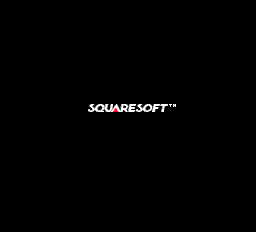
Press Step to draw one visible 8×8 tile placement at a time, from left to right and top to bottom. Blank cells are skipped so each step adds something to the picture. The label identifies the tile and its zero-based column and row. These are drawing steps after decompression and a compressed token does not necessarily line up with a tile boundary. Run draws the remaining tiles, and Reset clears the canvas. The slider also lets you remove tiles by stepping backward.
Try setting tileCount to 50. The demo still decompresses all the data, but reveals only tiles with indexes below 50. Then restore 128 to see the complete layer. Change map to "title" to arrange the same tiles using the title-lettering map, switch it back to "logo" for the boot logo.
This is the decoded BG2 asset layer at full brightness: 256×232 pixels, all 29 map rows, using the initial palette against black. The running game also has fades, palette changes, scrolling, and other display behavior. Those belong to presentation after decompression, so this is an asset reconstruction rather than a screenshot of a particular frame.
And there it is, finally! The logo, rebuilt from literals and backward copies.
The rest of the format tells us when to use it, how often to repeat it, and when to stop. The same decoder handles machine code, palette data, tilemaps, and tiles. Their meaning comes from the code that consumes the result.
The examples target the Secret of Mana USA ROM SHA-256 4c15013131351e694e05f22e38bb1b3e4031dedac77ec75abecebe8520d82d5f. Other releases may put the assets elsewhere.